What Images Really Are: Considering Images As Computational Representations
The digital world is one of the most fascinating wonders of human creation. Just as the universe is governed by natural laws established by God, the digital world is entirely defined and yet controlled by man. To better interact with our surroundings, we need sight; spatial data from the eyes interpreted by the brain. We, therefore, desire a representation of our visual surroundings to create a twin in the digital world. These representations are called Images.
In this blog post, we will examine images from the standpoint of a computer, and not the camera. (Picture it as what we “see” in the brain and not the eyes). Therefore, little will be said about their formation or geometry.
Images are organized collection of numbers called pixels. Images being numbers is unsurprising as computers understand only numbers. A pixel is a number or list of numbers typically grouped in three or four sets as we will better describe later when we look at types of images. These pixels serve as atoms; the building blocks for any image. The higher the number of pixels in an image, the better the quality or resolution.
Think of pixels as pebbles on a shore. They can easily be arranged to form different shapes based on their size or color. The smaller they are, the more detailed the shape formed is. Likewise the smaller a pixel is, meaning it gives room for other pixels, the greater the representation and consequently, the better the image looks. We see that our understanding of pixels is invariably the understanding of images.
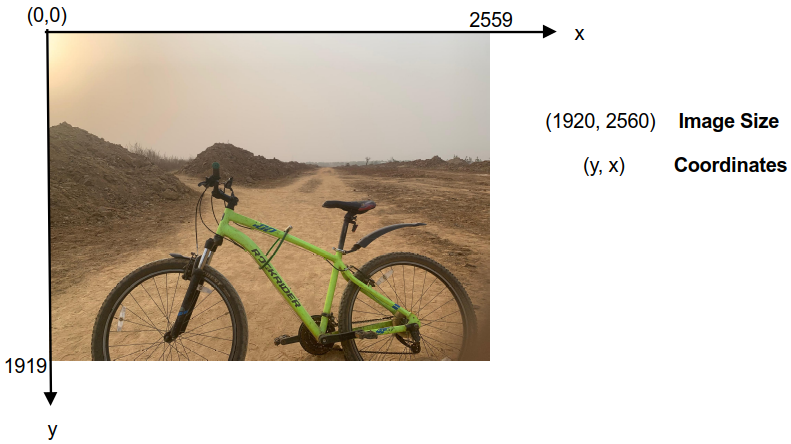
Since an image is a matrix, it is represented with rows and columns; where the number of rows specify the height, and the number of columns is the width. Hence, the dimension of an image is usually in the form: (rows, columns). For example, the image below has 1920 pixels along its height and 2560 pixels across its width. The upper left corner is the origin of the image coordinate system by convention, and indexing starts from zero.
There are two major types of images:
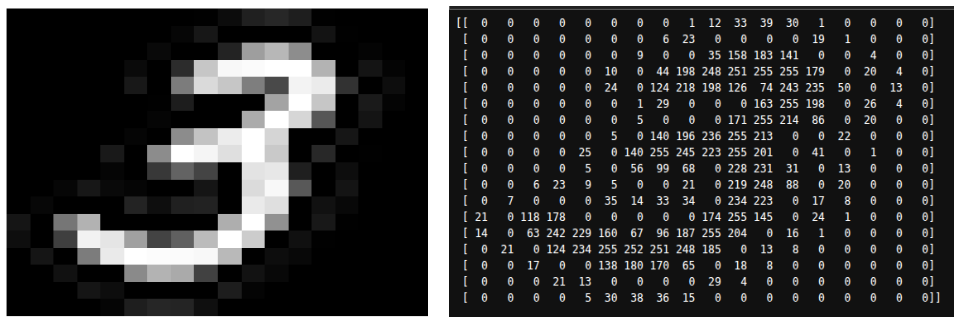
Grayscale Images:- In this representation, pixels take a single value which are either black or white or any shade in between. For uint8 (8-bit unsigned integer) which is most common, 256 values (2^8) are used. These values range from 0 to 255. 0 represents complete black, 255 for white, and numbers in-between for different shades of gray. We therefore see that these values encode the intensity of the pixel. The figure below is a comprehensive insight into this.
Note that “Black and White” images are simply stripped-down versions of grayscale images. Here, the pixel values are either black or white; hence its’ name. The pixel has values of either 0 (black) or 1 (white). For this reason, they are also referred to as binary images.
Color Images:- Most images we interact with belongs to this. Instead of a single value, a pixel is encoded as a set of three numbers. Each number correspond to a channel in a color space. A color space is simply a specific organization of colors that typically represents all possible human-perceivable colors. One of the most common color spaces is the RGB color space, which contains Red, Green, and Blue channels. Like grayscale, the R, G and B channels also range from 0 to 255 using uint8. These values also mean the intensity of the color elements.
In RGB, white is represented as (255, 255, 255) and black as (0, 0, 0). Other colors are a variation/combination of these three numbers. We see that this representation yields about 16 millon unique colors, many of whom the human eyes cannot perceive. The demonstration below is a thorough low-level understanding of this.

Other notable color space is HSV (Hue, Saturation and Value) which is crucial in computer vision for performing image analysis. Chances are that your image displaying software uses RGB than HSV.
As a special case, PNG images support a 4th channel called the “alpha” channel. The alpha channel contains transparency information, allowing specific regions within an image to appear transparent. Graphics and artistic design is one area of usage for PNG images.
One might ask, how then are videos represented? The answer to that seems clear. Just take a series of images, join them in a sequence, and play them in a loop (of a specified speed); then you have a video! The images in a video are called frames.
Thanks for coming to the end of this writing. I believe by now, you not only see an image for what it is. But you could see the numbers behind the scenes beautifully arranged in rows and columns, literally. (Oops, you are now a Terminator!).